Map Your KubernetesAttack Surface
Ingest a cluster snapshot, build a directed attack graph across RBAC, workloads, secrets, and nodes — then surface the most dangerous paths, choke points, and actionable remediation in a single command.
Why K8sAttackMap?
Most Kubernetes security tools check policy compliance in isolation — they tell you a pod is privileged or a role has wildcard verbs, but they don't tell you what an attacker can actually reach from that misconfiguration.
Connects the Dots
Parses every workload, RBAC binding, secret, and service account relationship across all namespaces to build a complete attack surface model.
CVE-Aware Scoring
Integrates Trivy vulnerability scan results directly into edge weights. A pod running a critical-CVE image gets a lower-friction traversal score.
Actionable Output
Every choke point and attack path comes with prioritised kubectl remediation commands — suitable for both daily ops and formal security audits.
How It Works
Five stages from raw cluster data to prioritised attack intelligence.
1. Ingest
kubectl live capture or JSON snapshot
2. Parse & Scan
K8sJsonParser + Trivy CVE scan
3. Build Graph
Directed weighted multigraph
4. Analyse
Dijkstra · BFS · Johnson's cycles
5. Report
Console · HTML map · PDF audit
1. Ingest
kubectl live capture or JSON snapshot
2. Parse & Scan
K8sJsonParser + Trivy CVE scan
3. Build Graph
Directed weighted multigraph
4. Analyse
Dijkstra · BFS · Johnson's cycles
5. Report
Console · HTML map · PDF audit
friction = (0.45 × source.intrinsic) + (0.55 × target.intrinsic)
friction -= cveBonus // critical CVE → lower friction
friction -= privilegedPenalty // privileged container → easier traversal
friction = clamp(friction, 0.1, 25.0)
Key Features
A complete security intelligence pipeline — from raw cluster data to prioritised, executable remediation.
Attack Path Discovery
Dijkstra finds the shortest (most dangerous) path. AllDirectedPaths surfaces all simple routes up to configurable depth, grouped by source→target pair.
Choke Point Ranking
Nodes ranked by the number of attack paths severed if hardened. The top-5 choke points — with weighted impact scores — tell you exactly where to focus.
Privilege Escalation Loops
Johnson's simple-cycle algorithm detects circular RBAC chains. An RBAC-only filter removes infrastructure ownership false positives.
Blast Radius Analysis
BFS from each compromised entry point up to configurable hop depth. Every impacted asset is labelled with its severity — Critical, High, Medium, or Low.
CVE-Aware Edge Weights
Trivy scan results feed directly into edge friction. A pod running a critical-CVE image gets a lower-friction traversal, reflecting real attacker economics.
Complete Edge Vocabulary
USES_SA · BOUND_TO · CAN_ACCESS · NODE_ESCAPE · EXEC_INTO · MINTS_TOKEN · HOST_PATH_ACCESS — 19 semantic edge types model every real attack capability.
GraalVM Native Binary
Built with GraalVM Native Image. No JVM required at runtime. Cold starts in milliseconds. Linux, macOS, and Windows binaries on every release.
HTML + PDF Exports
Interactive Cytoscape.js graph with blast-radius highlighting. Structured PDF audit report with executive summary, remediation cards, and CVE tables.
Actionable Remediation
Every choke point comes with specific kubectl audit and enforcement commands — from removing ClusterRoleBindings to enforcing Pod Security Standards.
Output Formats
Three output channels, each optimised for a different audience and use case.
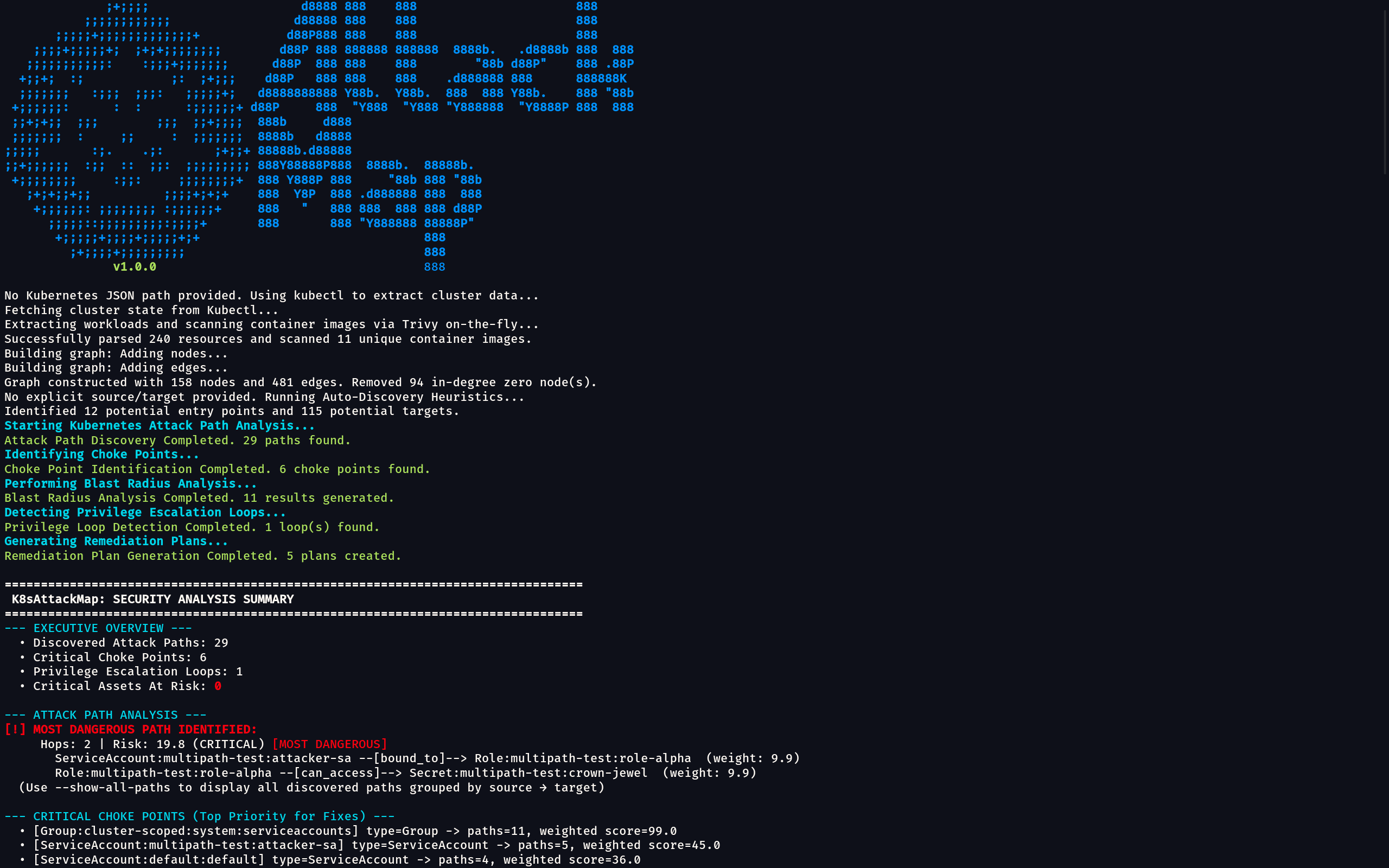
Color-coded terminal output with attack paths, choke point rankings, blast radius summary, privilege escalation loops, and per-path remediation steps.
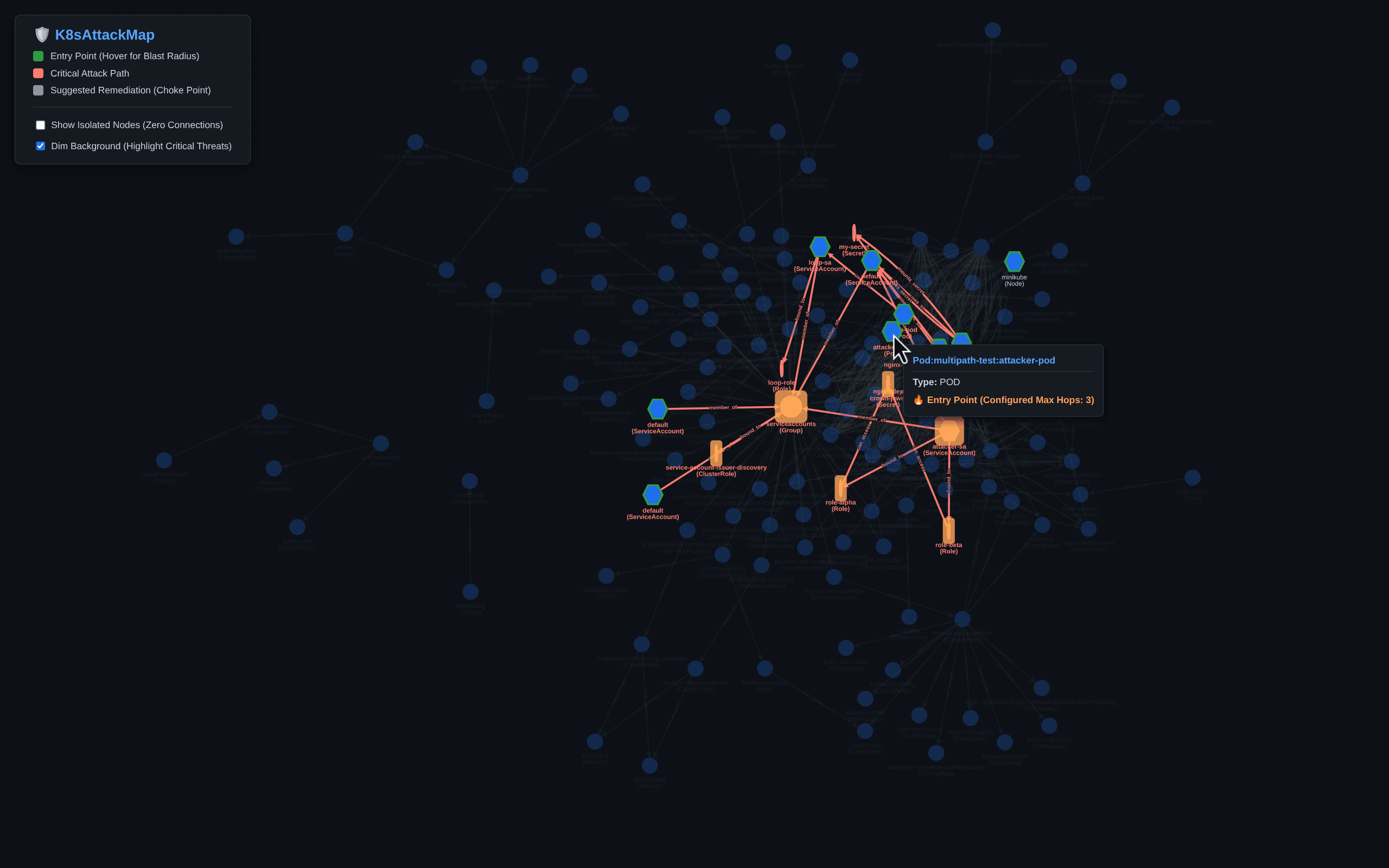
Interactive Cytoscape.js graph. Entry points in green hexagons, choke points in grey, blast radius in yellow, attack paths in red. Edges labelled by type and risk weight.
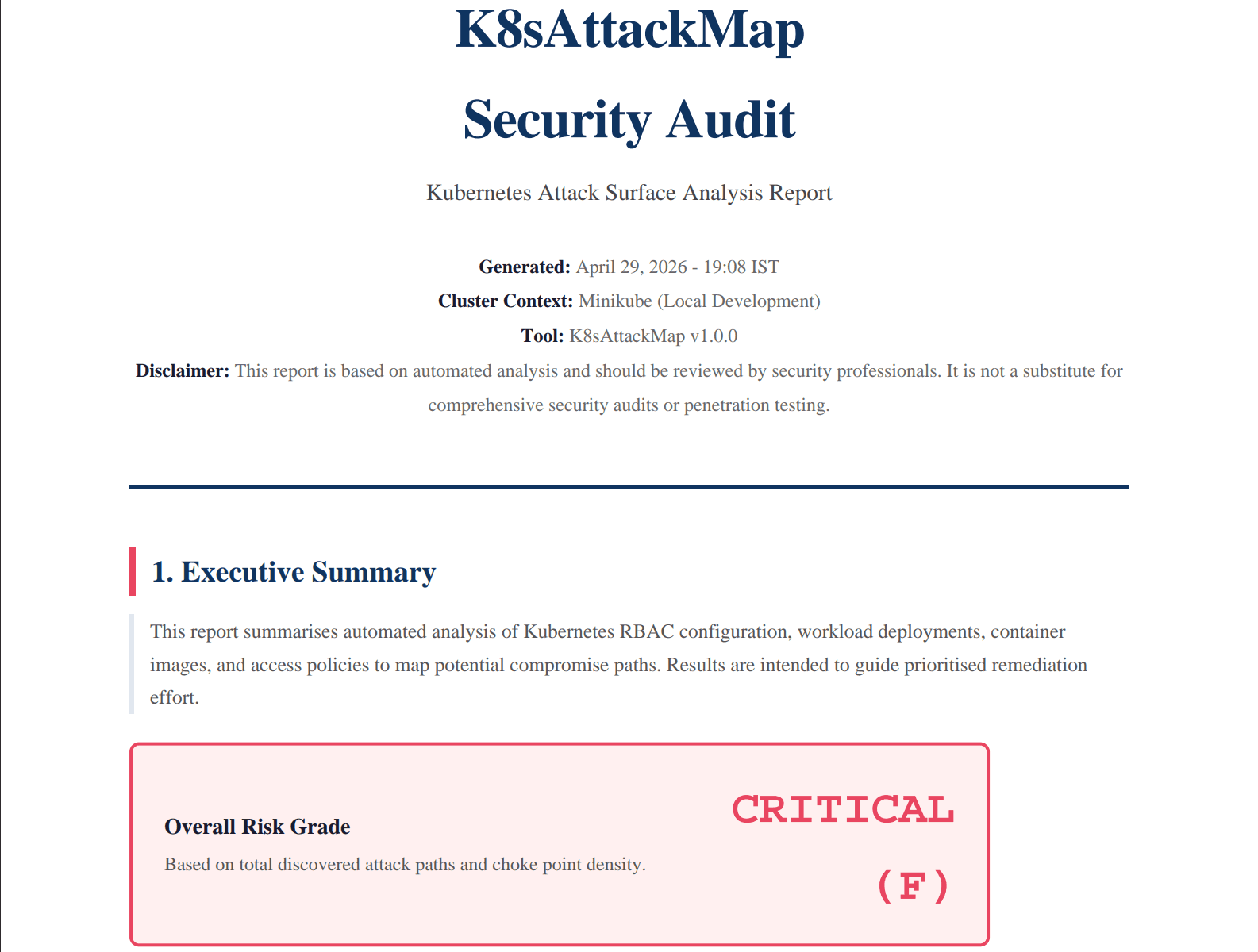
Structured audit report with executive summary, risk grade, choke point table, critical attack path hop-by-hop breakdown, remediation cards, and CVE summary.
Quick Start
From zero to your first attack map in under two minutes.
Install Trivy
# macOS
brew install aquasecurity/trivy/trivy

# Linux
curl -sfL https://raw.githubusercontent.com/aquasecurity/trivy/main/contrib/install.sh | sh -s -- -b /usr/local/bin
Download K8sAttackMap
# Get the latest binary from GitHub Releases
# Then make it executable (Linux / macOS):
chmod +x k8sattackmap
./k8sattackmap --version
Run Against Your Cluster
# Capture cluster snapshot
kubectl get pods,services,serviceaccounts,roles,clusterroles,\
  rolebindings,clusterrolebindings,secrets,configmaps,\
  deployments,replicasets,daemonsets,statefulsets,nodes \
  -A -o json > cluster-state.json

# Analyse and generate all outputs
./k8sattackmap -k cluster-state.json -o html,pdf
Community & Contributing
K8sAttackMap is open source under the Apache 2.0 license. Bug reports, feature requests, documentation improvements, and test contributions are all welcome.